Inventory management integration allows you to connect your sales system directly with your stock control tools, giving you real-time visibility into every transaction and product movement. It simplifies operations, reduces manual work, and helps you avoid overstocking or running out at the wrong time. More importantly, it builds a foundation for smoother payment processing and decision-making.
Key Takeaways:
- Inventory integration links stock levels with point of sale (POS) systems to improve accuracy and reduce manual errors.
- Real-time syncing enables faster replenishment and better visibility into purchasing trends.
- Connected systems simplify payment and inventory tracking, improving efficiency at scale.
How Point of Sale System Inventory Management Improves Business Operations
Your point of sale system does more than accept payments. It’s a nerve centre for retail operations, and once inventory is tied in properly, things start to flow differently. You notice fewer discrepancies, faster turnarounds, and better decision-making.
Automating Stock Updates for Accurate Inventory Control
When a product sells, the system deducts it from available stock. It seems obvious now, although not every retailer uses automation to this extent. Manual updates? They create lag, and lag creates confusion. Automation closes that gap.
Now imagine this happening across every location and sales channel, without delays. That’s the practical benefit of inventory management integration. You don’t need to double-check numbers or track inventory movement with spreadsheets. It just updates, quietly and reliably, right after every sale.
Reducing Errors and Improving Efficiency in Supply Management
Mistakes creep in when teams are moving quickly. Someone miscounts during a rush. An item gets scanned twice. Or maybe it gets missed entirely.
An integrated system catches those inconsistencies early. You won’t eliminate human error completely, although the tech works like a safety net. Alerts show when quantities dip below thresholds. Reorder rules kick in automatically. You stop firefighting and start managing proactively.
Optimizing Sales and Stock Replenishment Through Data Insights
It’s not just about knowing what you sold. It’s also about knowing when, how often, and to whom.
When inventory data feeds into your sales reports, patterns become clearer. You might notice sales of certain items spike on weekends. Or that demand for accessories picks up only after a main product sees a discount.
These kinds of insights don’t require guesswork anymore. They come straight from your integrated system, helping you plan more intelligently.
The Role of Inventory Integration in Streamlining Stock Control
At its core, inventory management is about control. The more connected your systems are, the less guesswork there is.
Connecting Inventory Systems with Payment Platforms
Let’s say your payment system registers a sale. Instantly, that transaction updates your stock records. You didn’t have to input anything manually. You didn’t even have to open a second app.
That kind of synchronization matters. It closes the loop between the front of house (payments) and back of house (stock). This is the heart of inventory management integration: making separate systems work as one.
When payments and inventory speak to each other, it becomes easier to reconcile end-of-day reports. You can spot mismatches right away, instead of uncovering them during a monthly audit.
How Seamless Data Syncing Prevents Overstocking and Stockouts
There’s a fine line between having enough stock and holding too much. Most businesses lean one way or the other, often swinging between the two.
That swing gets smaller once your systems sync properly. You can see what’s selling, what’s sitting, and what needs attention. Instead of bulk ordering on instinct, you begin ordering based on actual consumption rates.
Sometimes, syncing also reveals surprising gaps. Maybe a top-selling product is showing healthy sales, although inventory is nearly empty because the restock process lagged. That one insight can help prevent an outage and save the sale.
Improving Order Management with Real-Time Inventory Visibility
When orders come in from multiple sources, online, in-store, and mobile, it gets tricky to keep tabs on what’s available.
Real-time visibility changes that. If a product is low at one location, you can route orders from another. If it’s sold out everywhere, your system can mark it unavailable before customers place the order.
That might not seem revolutionary, although it prevents customer frustration. And that experience, smooth, fast, clear, often defines brand loyalty more than price or product.

How Modern Payment Methods Improve Inventory Tracking
It’s easy to think of payments and inventory as separate functions. One takes money in, the other manages goods out. Although in practice, they overlap more than most realize.
Linking Contactless Payments to Automated Stock Adjustments
Let’s take contactless payments. A tap triggers the sale, and behind the scenes, your inventory system gets the memo.
That trigger creates a chain reaction. The item gets deducted. Reorder points are checked. Stock thresholds update. It happens without a single click from your team.
And over time, this level of automation cuts hours from daily processes. Maybe even more during peak periods.
Improving Inventory Accuracy with Digital and Mobile Transactions
Mobile payments, QR codes, and digital wallets aren’t just customer conveniences. They’re also inventory signals.
Each digital transaction confirms that a product left the shelf. No ambiguity, no missed steps. The timestamp, product ID, and quantity all feed into the system instantly.
Even better, these systems help with mobile checkout setups. Think events, pop-ups, or satellite locations. You can move stock temporarily and still track it with precision.
Reducing Manual Work Through Integrated Payment and Inventory Systems
If you’ve ever had to match payment records with stock reports manually, you know how tedious that gets. Worse, it often results in mismatches and time lost chasing down anomalies.
An integrated system does that reconciliation in real-time. You’ll still review it, of course. Although the heavy lifting, the actual cross-checking, happens automatically.
It’s not glamorous, and maybe it’s easy to overlook. Still, over weeks and months, those minutes saved per transaction start to add up.
Using Modern Payment Solutions for Real-Time Inventory Updates
The move toward modern payment systems isn’t only about speed. It’s also about connection. And when those systems are connected to your inventory tools, real-time updates become a built-in feature.
The Impact of Cloud-Based Payment Systems on Inventory Management
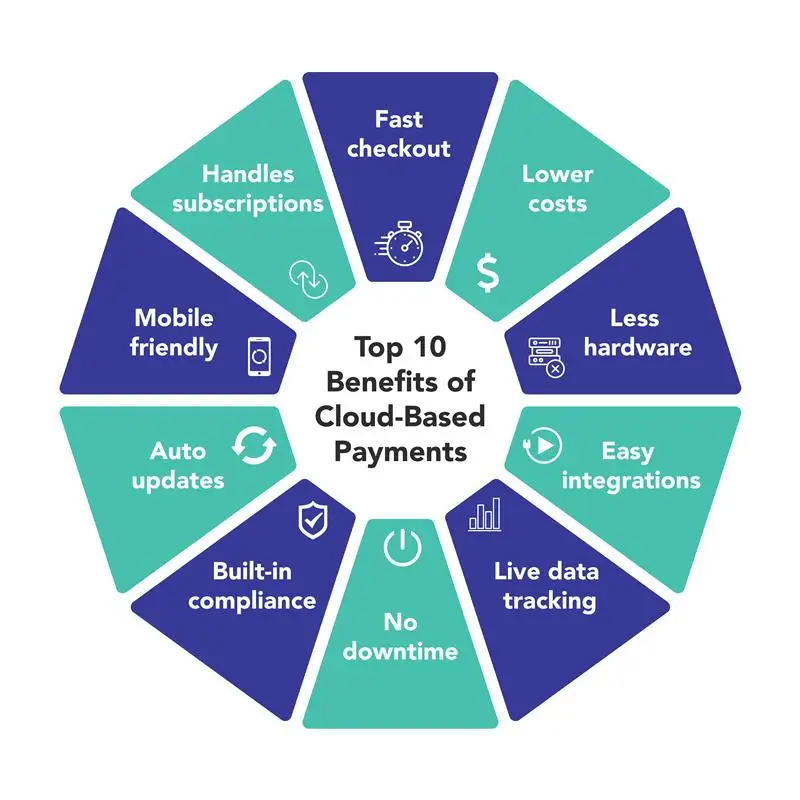
Cloud-based platforms have changed how businesses operate. You no longer need to be in-store to see what’s going on. That’s especially true for inventory and payment integration.
From your dashboard, you can see stock movements, sales trends, and order histories, even if you’re halfway across the country. That’s control, scaled.
And if you manage multiple locations, it means you can centralize oversight while allowing each site to operate independently.
How AI and Automation Improve Inventory Accuracy
Automation handles the rules. AI helps you learn from them.
When these tools are built into your inventory management integration, you get more than alerts. You get suggestions. For example:
- Which items are underperforming at a location
- Which products frequently sell together
- Which suppliers consistently delay deliveries
These aren’t opinions, they’re insights drawn from your own sales data. You can act on them with confidence.
Improving Customer Experience Through Faster Stock Reconciliation
Reconciliation might sound internal. And it is, partly. Still, its ripple effect reaches customers.
If a product shows up as “available” online and then turns out to be out of stock, trust takes a hit. If orders get delayed due to inventory mismatches, patience wears thin.
Faster reconciliation helps prevent that. Your systems talk to each other more often, reducing the window for discrepancies. Customers get accurate information, and your team avoids awkward explanations.

Rising Technologies Transforming Stock and Payment Synchronization
Emerging technologies aren’t just buzzwords anymore, they’re actively reshaping how inventory connects with payment systems. While not every business may be ready to adopt every innovation, keeping an eye on what’s evolving can give you a significant edge. Even a small tweak, like adding automation to one part of the workflow, could be the difference between reacting late and acting early. Below are some of the most promising developments making their way into the hands of forward-thinking teams:
- RFID Tags: Enable fast, contactless inventory scans without relying on manual counts. These help retailers achieve near-instant updates and improve accuracy at every touchpoint.
- Mobile POS Units: Allow staff to sell and track stock anywhere in the store or at satellite events. These systems sync directly with inventory, providing a seamless bridge between purchase and product movement.
- Blockchain Inventory Records: Though still maturing, blockchain shows potential for creating tamper-proof logs of supply chain activity. This may reduce fraud risk and improve supplier accountability.
- Automated Restocking Systems: Robotics and smart shelving solutions are helping some warehouses manage stock automatically. This minimizes delays and lowers the risk of out-of-stock events.
- AI-Based Forecasting Tools: These systems analyze purchase history and market signals to anticipate future demand, enabling smarter stocking decisions before shortages or surpluses happen.
Even if you only adopt one or two of these technologies, the gains in speed and accuracy can be meaningful. Staying current helps you prepare, and gives your business room to grow into what’s next.
Making Integration Work in Your Business Operations
Inventory management integration sounds complex, although it becomes manageable once you break it into steps. You don’t need to rip out your current tools or start from scratch. You just need a clear path forward, one that aligns with your daily operations. Here’s a straightforward process to follow:
Step 1: Audit Your Current Systems
List out every tool you’re using for payments, sales, inventory, and reporting. Include software, apps, and even spreadsheets. Identify where data overlaps and where gaps exist. Are your teams entering the same numbers in two different systems? That’s your first clue.
Step 2: Prioritize the Most Critical Connections
You don’t need to integrate everything at once. Start with what creates the most friction. That could be syncing your POS with your stock database, or automating updates between your online store and warehouse inventory.
Step 3: Choose Integration-Ready Platforms
Modern POS and inventory tools often come with built-in integrations or third-party plugins. Look for systems that already “talk” to each other, or ones that offer open APIs if custom work is needed. Pre-built connectors reduce both cost and complexity.
Step 4: Set Up and Test Integration in Phases
Don’t rush to flip the switch across your entire operation. Start with one product line, one store location, or one channel. Let the integration run for a week or two. Review the sync logs, sales updates, and inventory adjustments. Iron out bugs early.
Step 5: Train Your Team on the New Workflow
Even the best tech won’t deliver if your staff isn’t aligned. Run through what changes for them. What no longer needs to be done manually? What should they watch for if syncing fails? Keep it simple and focus on the “why.”
Step 6: Monitor, Adjust, and Expand
After rollout, continue reviewing system logs and inventory data. Are your alerts accurate? Are reorder points triggering as expected? Once confident, apply the same integration logic to new locations or departments.
This kind of implementation doesn’t happen in a day. And that’s okay. Progress in stages. Build momentum. With every integration step you complete, things get easier. Cleaner. More predictable. Which, honestly, is exactly what your operations need.
Accepting Smarter Operations Through Inventory Management Integration
Inventory management integration isn’t just a technical upgrade. It’s a mindset shift, toward smarter systems, faster decisions, and fewer avoidable problems. Every time your sales and stock systems sync, you gain a little more control. A little more speed. And honestly, a lot more breathing room.
So if you’re juggling payment systems, inventory records, and manual checks across multiple tools, maybe it’s time. Let integration carry the weight. Focus your team on what really drives value. Let the system handle the rest.